What’s for me?
Suggestions from your menu when guests cannot decide.
Guests answer a few questions and MyBon suggests products from your menu based on their answers. It is an easy starting point for trying something new.

QR MENUS FOR CAFÉS AND RESTAURANTS
Change prices easily and show your dishes with photos. MyBon adds themes, offers and smart suggestions to help your guests decide what to try.
Opens with a QR code. No app download needed.
FOR YOUR BUSINESS
EXPLORE MYBON
Choose a look, present your dishes and highlight your offers. Select a feature below to try the MyBon menu.
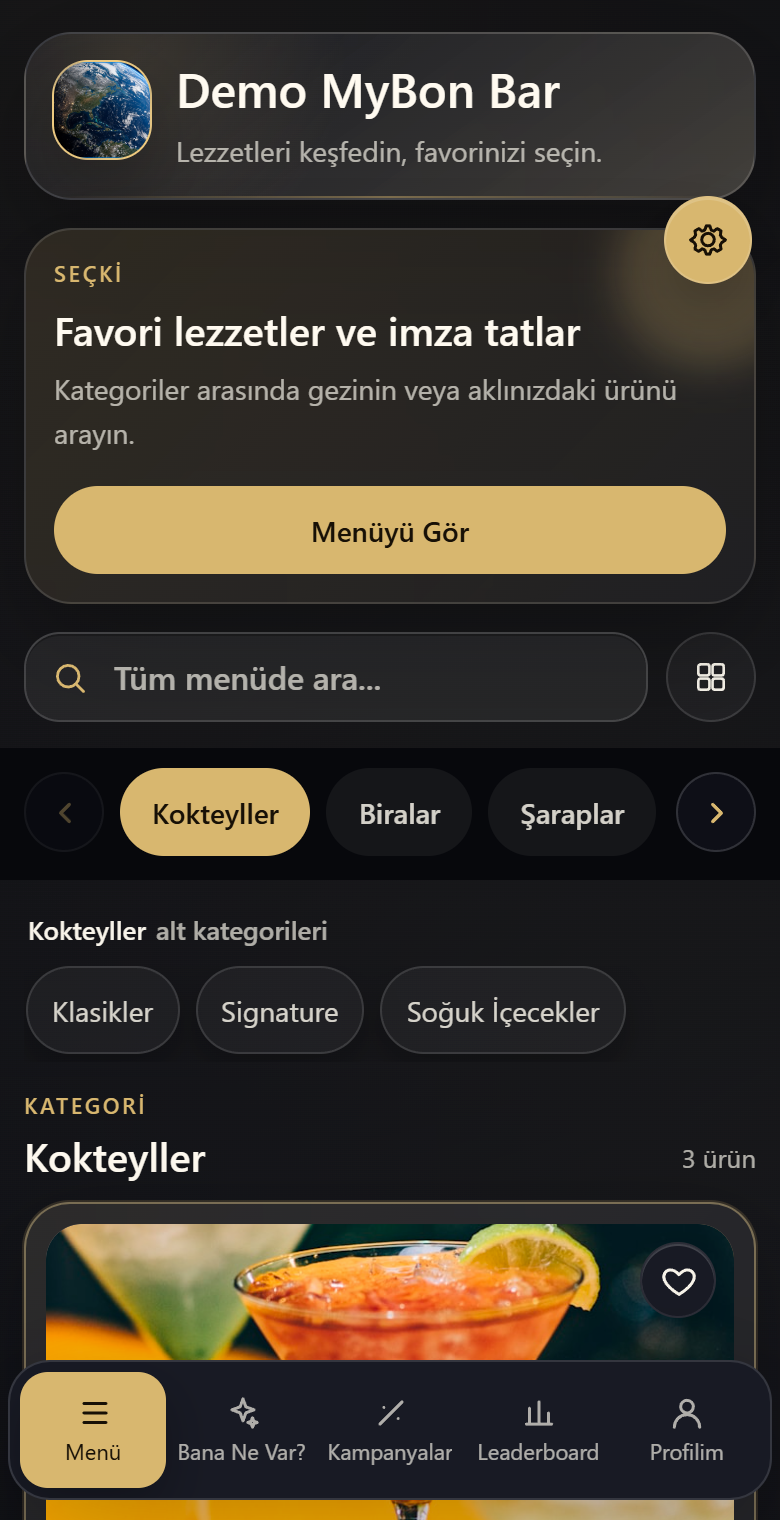
Guests scan a QR code to open your menu. Photo categories, search and a clear layout help them find what they want.
Theme Colors
Available features and allowances depend on your plan. These previews show sample data.
Open Menu ↗Why MyBon?
Tools that save you time preparing your menu and help guests choose. The features below depend on your selected plan and allowances.
Open Menu ↗PLANS
Compare product capacity and the features you need. We can help you choose.
The essentials for sharing your menu by QR code.
Ask us about this plan.
Bring each dish to life with photos, descriptions and serving options.
Make favourites easy to find with clear, inviting menu sections.
Share the work with your team while keeping access in your hands.
Enter portion and calorie values yourself. Included in every plan; no AI calculation is used.
Welcome guests with a menu they can read in their own language.
Choose light or dark themes, classic lists and photo category layouts to suit your venue.
See which dishes attract attention and get to know your guests’ favourites.
Suggests menu items using preset preference questions and menu matching, without AI.
Let guests create a profile and enjoy a more personal menu experience. Not included in this plan.
Let guests save the dishes they love on their device and find them easily again. Not included in this plan.
See who updated your menu and keep track of your team’s work. Not included in this plan.
Prepare your menu in other languages with less effort. Review the wording, then share it. Not included in this plan.
Turn your printed menu into a digital draft. Review it and save time on typing. Not included in this plan.
Help guests make informed choices with a calorie estimate for each portion. Not included in this plan.
For businesses that want more menu features.
Ask us about this plan.
Bring each dish to life with photos, descriptions and serving options.
Make favourites easy to find with clear, inviting menu sections.
Share the work with your team while keeping access in your hands.
Welcome guests with a menu they can read in their own language.
Choose light or dark themes, classic lists and photo category layouts to suit your venue.
See which dishes attract attention and get to know your guests’ favourites.
Let guests create a profile and enjoy a more personal menu experience.
Let guests save the dishes they love on their device and find them easily again.
See who updated your menu and keep track of your team’s work.
Help undecided guests discover dishes that suit their taste.
Turn your printed menu into a digital draft. Review it and save time on typing.
Help guests make informed choices with a calorie estimate for each portion.
Prepare your menu in other languages with less effort. Review the wording, then share it. Not included in this plan.
For a more complete menu and guest experience.
Ask us about this plan.
Bring each dish to life with photos, descriptions and serving options.
Make favourites easy to find with clear, inviting menu sections.
Share the work with your team while keeping access in your hands.
Welcome guests with a menu they can read in their own language.
Choose light or dark themes, classic lists and photo category layouts to suit your venue.
See which dishes attract attention and get to know your guests’ favourites.
Let guests create a profile and enjoy a more personal menu experience.
Let guests save the dishes they love on their device and find them easily again.
See who updated your menu and keep track of your team’s work.
Prepare your menu in other languages with less effort. Review the wording, then share it.
Help undecided guests discover dishes that suit their taste.
Turn your printed menu into a digital draft. Review it and save time on typing.
Help guests make informed choices with a calorie estimate for each portion.
Each plan’s included features are listed below. Contact us about AI allowances and the right option for your business.
COMMON QUESTIONS
MyBon does more than put a price list online. It turns your menu into a visual, easy-to-explore QR experience that can be updated whenever your business changes. Depending on your plan, you can add languages, campaigns, favorites, What’s for me?, the Translation Assistant and visitor-focused features.
No. Guests scan the QR code with their phone camera and the menu opens directly in the browser; there is no app to install. An account is not required to browse. Signing in may be needed for features such as saving favorites or member-specific experiences.
Yes. You can open the sample menu on this page immediately. If you would like to try it with your own products, contact us; where appropriate we can create a time-limited business demo. Your plan and usage allowances are then clarified in your offer before subscription.
Your business receives its own menu address on MyBon. You can use it in QR codes on tables and counters, on social media, your website, your Google Business profile or in messages. Menu-name availability is checked during setup.
Yes. Your domain and hosting can remain yours. We can set up a redirect from your domain or the “Menu” link on your existing website to your MyBon menu. Guests can arrive through the address you share while the MyBon application continues to run securely on MyBon infrastructure.
No. MyBon is a SaaS subscription service and runs only on MyBon infrastructure. Source code and application files are not delivered for installation on customer hosting or private servers. You may use your own domain through redirection; this does not move the application to your server.
No, as long as your menu address stays the same. Update prices, descriptions, photos and product status and the same QR code continues to open the current menu. Temporarily unavailable items can be deactivated and published again later instead of being deleted.
Yes. Depending on your plan, you can adapt the logo, theme and menu layout to your venue. MyBon includes classic and visual presentation options plus 12 themes, six light and six dark. You can also try the looks in the sample menu.
Yes. Add multiple photos to a product, choose its cover image, write a description and define separate prices for portions, sizes or serving options. Category and product capacity is determined by your plan.
Yes. Excel import can prepare categories and products in bulk. If Image Menu Import is included in your plan, you can also process photos of printed menu pages. AI-extracted names, categories and prices are reviewed before saving, and image processing uses the allowance assigned to your business.
Plans with Multilingual support let you add supported languages to your menu. If the Translation Assistant is also included, it can draft other active languages from your primary product and category content. Translations are not published automatically; you can review and edit them before saving.
Guests answer a few preference questions and MyBon matches those signals with suitable products in your own menu. Guests who are not members can still use the local question pool and recommendation engine. If the plan and business settings allow it, AI can personalize question wording for signed-in members. The configured AI question count is a maximum conversation depth, not a spendable question balance; the flow can finish earlier when it has enough information.
Yes. Create campaigns for selected products, define active days and times and highlight Happy Hour when it matters. Offers can stand out at the right moment without turning the whole menu into a promotion board.
When membership is enabled, guests can create an account, save products they like and find them again next time. Other regular-guest or leaderboard features included in your plan can support repeat visits and engagement. Guests who simply want to browse can continue without an account.
No. Image import, calorie estimation, the Translation Assistant and AI-assisted What’s for me? operate within the allowances or upper limits assigned by your plan or a business-specific offer. If your business needs different limits, MyBon can define additional or custom allowances during the offer process or later. Usage is enforced on the server according to each feature’s rules.
No. AI-generated calorie values are estimates based on the product, portion and available ingredient information; they are not laboratory measurements or medical nutrition declarations. The business can review the result before publishing and edit the value when necessary.
If your plan includes Visitor Reports, you can review signals such as menu visits, product interest, favorites and time spent in the menu. Team Reports help track significant actions performed by panel users. These are menu and team-activity reports, not till, accounting or payment reports.
Yes. Within your plan’s user capacity you can create team accounts and restrict each person to the areas they need. That keeps day-to-day menu work collaborative without giving every user the same level of access.
A suitable paid subscription can be activated while retaining your existing menu content. Your product, category, media and user counts need to fit the selected plan. Once a permanent menu address is assigned, the old demo link can be redirected to it.
MyBon can prepare a business-specific offer. For example, we can define extra onboarding image imports, different AI limits or usage allowances that differ from the standard plan. Approved terms are applied specifically to your subscription and can be adjusted later when your needs change.
The MyBon service presented here focuses on the QR menu and features that enrich the menu experience. Online ordering, payment collection and POS/till integrations are not automatically included in a standard QR menu subscription. Tell us about those requirements before the offer so the available scope can be clarified separately.
If you can sign in, open a request from Support Tickets in the business panel. If you have lost your login details, contact the MyBon team; after the required security verification we can help you restore access.
Your selected plan, billing period, price, any business-specific allowances and other terms are stated in your offer and the applicable service agreement. You can review them before subscribing and follow the status of an active subscription in your panel.
Your business is responsible for products, prices, descriptions, allergen and nutrition information, images and offer terms. MyBon provides the technical menu service and is not the seller. You must also review AI-generated content before publishing it.
Your authorized staff can view member details, preferences, favorites and relevant reports within their permissions. Authorized MyBon technical staff may access data as needed to operate the service, maintain security, provide support, fix errors or meet legal obligations. There is no feature that uses this data for MyBon’s own marketing. See the privacy and data processing notices for details.
LET’S GET STARTED
Tell us about your business and how you want to use your menu. We will help you choose a suitable plan.
